Record List - List Box Table Lookup
Description
The Record List - List Box tab of the Table Lookups form contains two list boxes.

Vendor Choices for Record List - List Box
The Field Properties Choices tab of the Record List - List Box displays the Vendor_Name field and stores the Vendor_No from the Vendor table. The records are sorted alphabetically by Vendor_Name.

Procedure
Select the list box and right click.
Click the Properties ... selection.
Click the Choices tab.
In the From Table field, select "vendor".
In the Return value field, select "vendor_no". This is the field that the form will store.

Click the Add New Column to Record List button.
Select "vendor_name" in the Field list.
Change the column title to "Name" in the Header field.
Click the OK button.
Click the Add New Column to Record List button.
Select "vendor_no" in the Field list.
Change the column title to "Number" in the Header field.
Product Choices for Record List - List Box
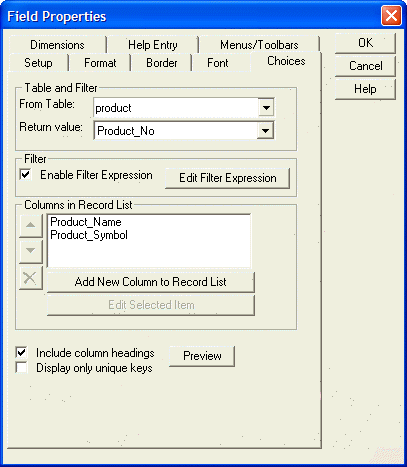
The Field Properties Choices tab of the Record List - List Box displays the Product_Name field and stores the Product_No field from the Product table. The records are sorted alphabetically by Product_Name.
Procedure
Select the list box and right click.
Click the Properties ... selection.
Click the Choices tab.
In the From Table field, select "product".
In the Return value field, select "product_no". This is the field that the form will store.
Click the Add New Column to Record List button.
Select "product_name" in the Field list.
Change the column title to "Name" in the Header field.
Click the OK button.
Click the Add New Column to Record List button.
Select "product_symbol" in the Field list.
Change the column title to "Symbol" in the Header field.
Product Filter for Record List - List Box
In addition, the Product_Name records are limited to those where Product_Vendor_No field equals Quote_Vendor_No_OP3. A change in the Quote_Vendor_No_OP3 field triggers a refresh of the Product list.
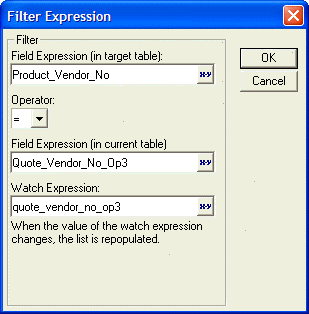
Check the Enable Filter Expression check box and click the Edit Filter Expression button.
In the Field Expression (in target table) field, enter "Product_Vendor_No".
In the Operator field, select "=".
In the Field Expression (in current table) field, select "Quote_Vendor_No_Op3".
In the Watch Expression field, select "Quote_Vendor_No_Op3".
In the Display order field, select "product_name".
Click the OK button to return to the Field Properties dialog box.
Click the OK button to return to the Form Editor.
The Table Lookups sample database can be downloaded.
See Also